

Series: Building the AI Foundation · Part 5. Part 1 laid out the seven layers. Part 2 covered the context layer. Part 3a and Part 3b covered the gates for code and for plant records. Part 4 covered the control plane. This one is about a small, cheap kind of model that fits inside all of them.
Here’s a question worth asking before your next AI project: does every decision in your workflow need a frontier model? I’d argue most of them don’t.
Think about what actually happens in a day at a plant or an IT shop. A ticket arrives and somebody decides who gets it. An invoice shows up with a price that doesn’t match the purchase order, and somebody decides whether to pay it, question it or stop it. Thousands of small calls like that, every day. None of them needs a model that can write a sonnet. They need a fast, cheap, consistent answer, and a clear signal for when to hand the case to a person.
That’s the job of a new class of small decision models. They sit in the gap Part 3 left open, between “an agent proposes” and “a person decides.”
A middle tier
In Part 3 the rule was simple: agents propose, people approve. That works, but it has a cost. If a person has to look at every proposal, the reviewer becomes the bottleneck, and tired reviewers click approve. I’ve seen that movie.
A decision model adds a middle tier. For each case it returns a typed answer plus a confidence value, and you decide in advance what happens at each level:
High confidence on a low-stakes call: the workflow proceeds on its own, and the call is logged.
Middle confidence: the system asks for more information or shows a person a suggestion.
Low confidence, or any high-stakes call: it goes to the named owner.
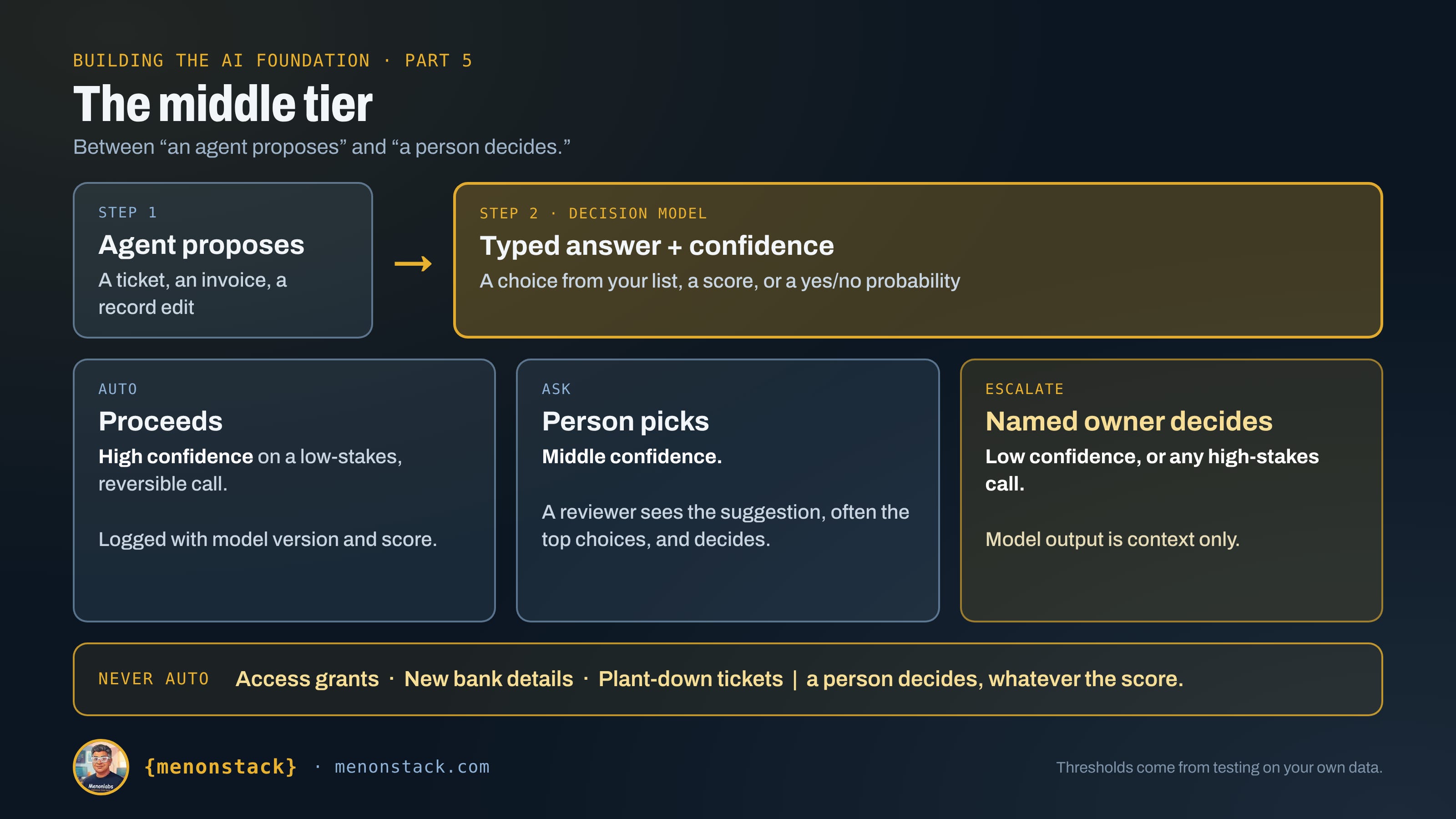
The person is still in charge. The difference is that their attention goes to the cases that need it.
What a decision model is, and isn’t
A general language model writes text, and you coax that text into a shape your code can read. A decision model skips that step. You hand it a situation and a typed question, and it returns a choice from a list you defined, a score on a rubric, or a yes/no probability.
The best-known new example is TypeSafe AI’s Jev, launched in September 2026 by a team of former OpenAI researchers. Per coverage of its launch, it returns structured decisions with a confidence value and lets developers set thresholds for proceeding, asking or escalating. OpenAI has a Decisions API along similar lines, which different sources describe as a limited preview or a public beta. Within weeks of Jev, Cloudflare released an open-weight family called Clef, and a much smaller open model called Laya appeared too. I’d treat all of them as early. The speed and cost claims come from the vendors, access and pricing are described differently in different places, and I haven’t seen independent testing worth leaning on.
The pattern matters more than the product, because you can build it other ways. I’ll get to that.
Example 1, IT: help desk triage
If you want one place to start in IT, start with the help desk. Every ticket needs a category, an assignment group and a priority, and a human currently does that by reading a short description.
This isn’t hypothetical. ServiceNow’s Predictive Intelligence classifies incident fields from the description and documents a confidence check in the flow. Compare the model’s confidence to a threshold your admin sets, and if it falls short, the field is left for a person. That’s the middle tier, already built into a mainstream tool.
Here’s the sober part. In an October 2025 study of 8,968 real tickets across 123 categories, a vendor team found that a simple classifier got the exact category right about half the time (roughly 47 to 50 percent), while the correct category appeared in its top three suggestions about 86 percent of the time. Two lessons. A small model doesn’t need to be fancy to be useful, and “suggest three, let the human pick” is a realistic mode, while “decide for me” often isn’t.
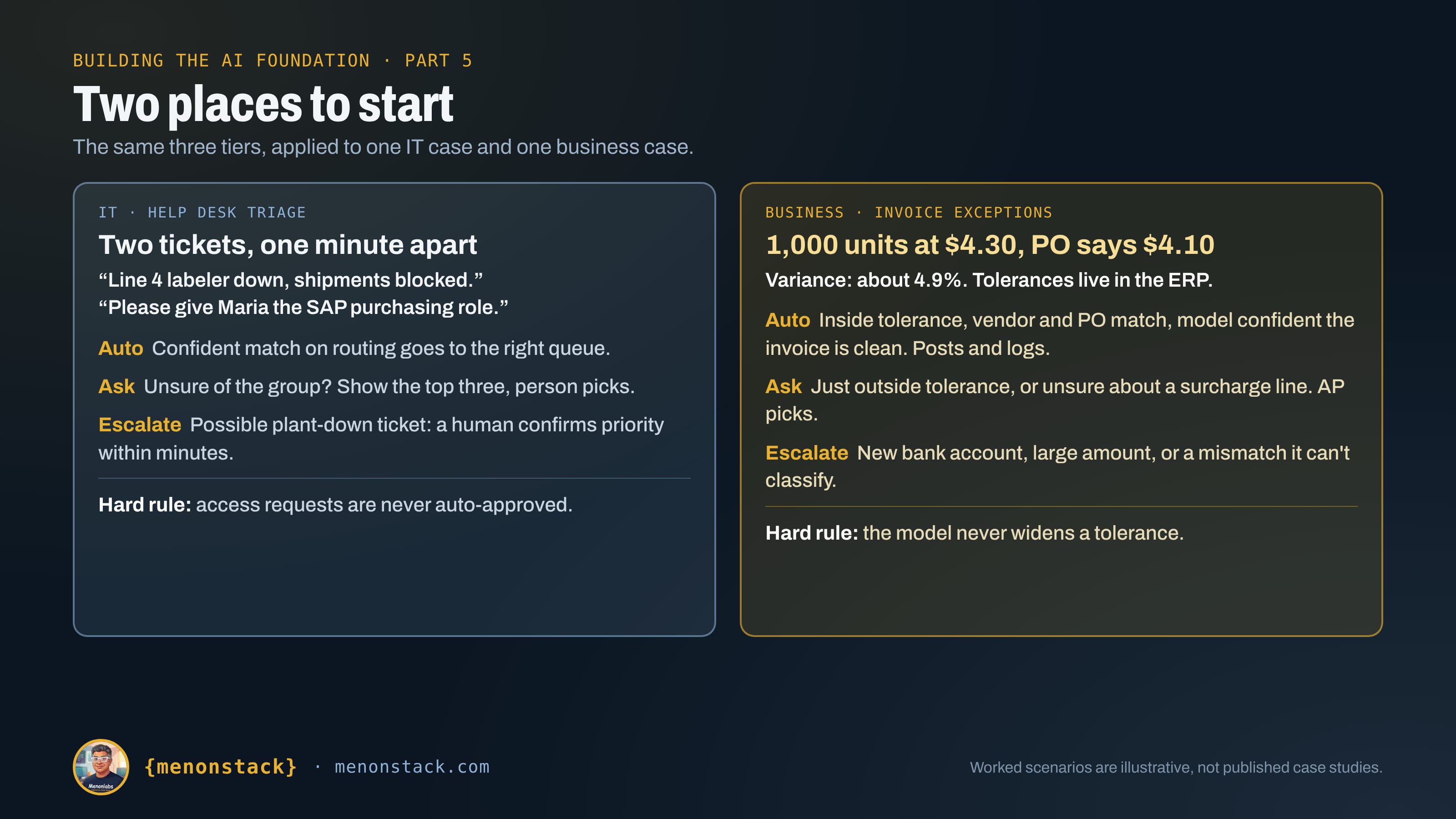
Now put it on a plant floor. Two tickets arrive within a minute:
“Line 4 labeler down, shipments blocked.”
“Please give Maria access to the SAP purchasing role.”
The decision model can read both and answer typed questions: which assignment group, and is this a production-impacting outage? A confident match on routing can go straight to the right queue. But I’d set two hard rules that no confidence score can override. A possible plant-down ticket always gets a human confirming priority within minutes. And access requests are never auto-approved, because that’s a segregation-of-duties question, not a classification one.
One caution if you’re tempted to widen this to security alerts. CrowdStrike’s published work on alert triage found that a fine-tuned small model beat general-purpose models on accuracy, but the model’s own confidence wasn’t reliable enough to trust, so they added a separate calibrator. Those numbers are vendor-reported. The lesson holds regardless: don’t take the confidence score on faith.
Example 2, business: invoice exceptions
The business case I’d pick for a manufacturer is accounts payable, because the money is real and the rules are already written down.
SAP’s own reference architecture for invoice processing describes this exact pattern. Each extracted field carries a confidence score from 0 to 100 percent, with around 90 percent typical for critical fields. Invoices that clear the confidence bar and match the purchase order and goods receipt within your price and quantity tolerances are confirmed automatically. Mismatches go to a person in AP. SAP doesn’t publish a measured straight-through rate there, so I won’t quote one.
For context on why anyone bothers, Ardent Partners’ 2025 benchmarks, as summarized by apexanalytix, put the average invoice exception rate at 14 percent. Average touchless processing was 32.6 percent against 49.2 percent for the best performers, and cost per invoice was $9.40 on average versus $2.78 for the best. Vendors claim much higher automation (Genpact says around 80 percent touchless at one client, for example), but they define the metric differently, so I wouldn’t compare them side by side.
A worked example. An invoice arrives for 1,000 units at $4.30. The PO says $4.10. The variance is about 4.9 percent.
Auto: the variance sits inside your configured tolerance, the vendor and PO match, and the model is highly confident the invoice is clean. It posts, with the model version and confidence logged.
Ask: the variance is just outside tolerance, or the model is unsure whether a surcharge line is legitimate. AP gets a one-screen suggestion and picks.
Escalate: a new bank account on the vendor record, a large amount, or a mismatch the model can’t classify. It goes to the named owner, always.
The tolerances stay as hard limits in the ERP. The model never gets to widen them. If your auditors ask, the answer to “who approved this?” has to name a rule or a person, and the log has to show which model version and what confidence led there. An advisory piece from Uniqus makes the same point about treating AI agents as non-human identities in your segregation-of-duties matrix and logging their inputs, outputs, model version and confidence. That’s Part 4 showing up again.
The threshold table
This is the part to copy. Adapt the numbers to your own data, because mine are placeholders.
Tier Confidence Stakes What happens Auto High (set from your own testing) Low, reversible Proceeds. Logged with model version and score. Ask Middle Low to medium Person sees a suggestion, usually the top choices, and picks. Escalate Low, or any High, or a controlled record Named owner decides. Model output is context only. Never auto Any Access grants, new bank details, plant-down tickets Human decision, whatever the model says.
Trust the score only after you test it
A confidence number is only useful if “90 percent” actually means right nine times in ten. That property is called calibration, and it doesn’t come free.
The classic finding, from Guo and colleagues in 2017, is that modern neural networks are often overconfident, and that simple recalibration fixes much of it. For language models the picture is mixed. A 2023 study by Tian and colleagues found that asking a chat model to state its confidence often produced better-calibrated numbers than reading its token probabilities. Neither result tells you how a particular model behaves on your invoices or your tickets.
So test it. Run the model in shadow mode for a few weeks, with people still making the real decisions. Compare confidence against outcomes. Pick your thresholds from that data, not from the vendor’s demo. And pin the model version, because an upgrade can shift the distribution your thresholds depend on. Hosted decision models ship new versions quickly. The Jev listing I read already showed a newer release than the one I opened.
Also watch the human side. The EU AI Act’s human oversight article asks that people overseeing a system stay aware of its tendency to over-rely on the output. A model that’s right 95 percent of the time trains reviewers to stop looking. Sample the auto-approved cases on purpose.
Open-source alternatives
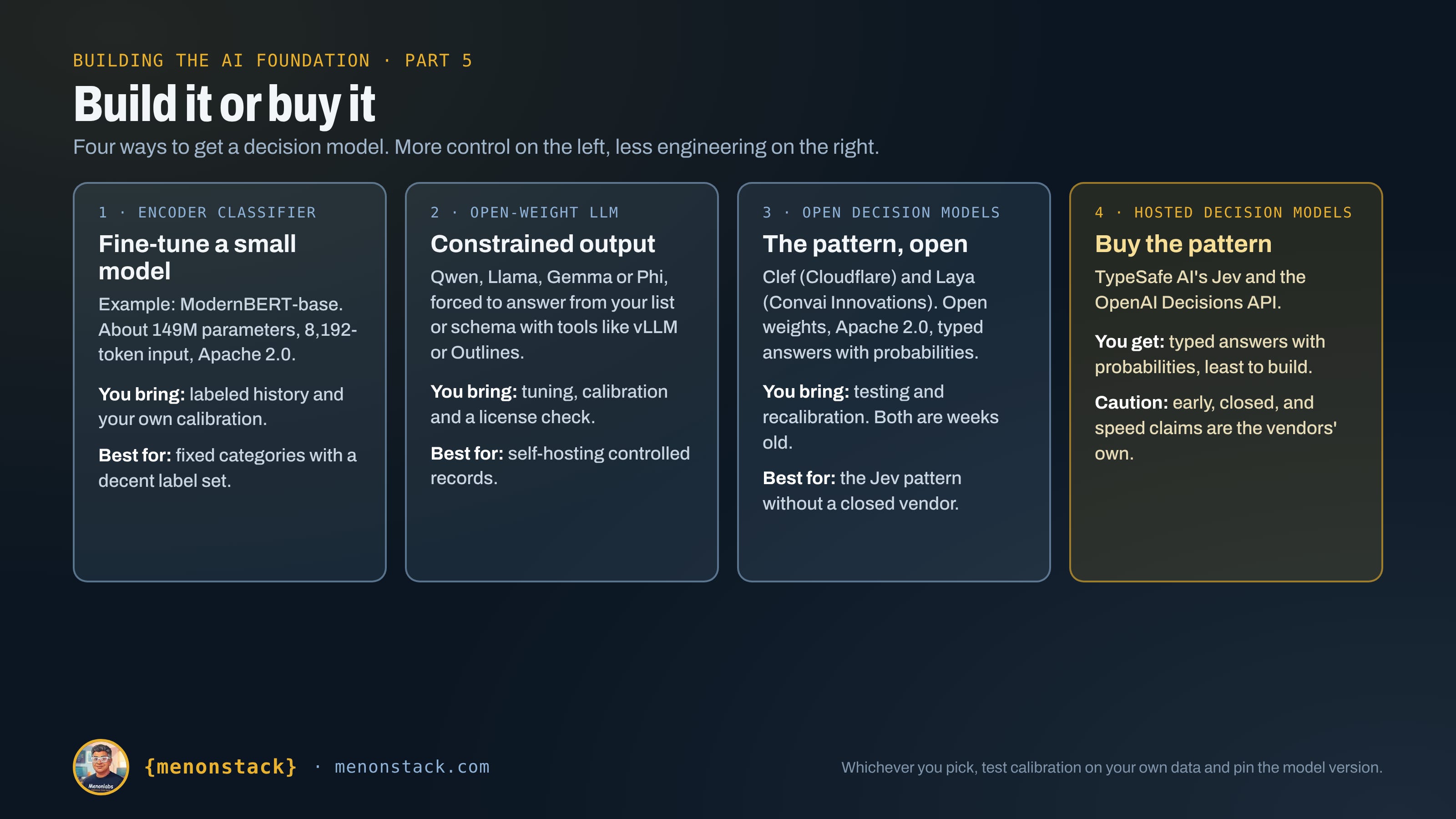
You don’t have to buy this pattern. Here are the options I’d look at, from lightest to heaviest.
An encoder classifier. Models like ModernBERT are small, run on modest hardware and are built for classification once you fine-tune them. ModernBERT-base is about 149 million parameters, supports 8,192-token inputs and is released under Apache 2.0. You’d need labeled history, such as past tickets or invoice outcomes, and you’d calibrate its scores yourself. For fixed categories and a decent label set, it’s often the cheapest and fastest route.
A small open-weight language model with constrained output. Models from the Qwen, Llama, Phi and Gemma families can be forced to answer in a fixed shape. Serving tools such as vLLM, plus libraries like Outlines, XGrammar and llama.cpp’s grammar support, can restrict the output to one of your allowed choices or a strict schema. You get typed answers, and you can read token probabilities for a confidence signal. This is the flexible, build-it-yourself route. You carry the tuning and calibration work, and you should check each model’s license terms before production use.
Purpose-built open decision models. This is the newest option, and it’s the closest open match to the Jev pattern. Cloudflare released Clef in October 2026 as open weights under Apache 2.0. It returns typed answers with probabilities in a single pass instead of generating text, and Cloudflare describes it as compatible with Jev’s API. Laya, from Convai Innovations, is a much smaller Apache 2.0 model built the same way. Its own page says the shipped checkpoints are over-confident and should be recalibrated and fine-tuned on your data. Both are weeks old, and the benchmark numbers I’ve seen are the vendors’ own, so I’d test them on your cases before trusting any of it.
A guard model as a precedent. Safety classifiers such as Llama Guard already work as gate checks: they read an input or output and return a verdict from a short list. If your security team already runs one, you’ve already accepted the pattern.
The trade-off is straightforward. The proprietary options promise less engineering and a stated focus on calibrated outputs. The open options give you control, data that stays inside your walls, and a predictable bill, at the price of building the evaluation yourself. For a regulated plant, I lean toward starting open and self-hosted for anything touching controlled records, and treating the proprietary models as something to benchmark against.
Eight ways to build it
There are eight realistic ways to get a decision model, from plain rules to hosted APIs from the big vendors. Subscribers get the full side-by-side comparison of all eight, with pros, cons and best use for each, in the section at the end of this article. It’s free to subscribe.
None of these is the right answer everywhere. A plant often ends up with two or three: rules for the hard limits, a platform feature for the common queue, and a self-hosted model for the records you can’t send out.
Where it plugs into the series
Part 3b, the operations gate: the rule-check step. The model reads the proposed edit and answers typed questions against your business rules, and anything uncertain goes to the record’s owner.
Part 3a: triage for pull requests, deciding which ones need deeper review.
Part 4, the control plane: a data-tier check at the gateway, and a typed, loggable answer for the audit record.
Cost: a cheap model for the high-volume checks leaves the expensive one for the work that needs it.
Five ways this goes sideways
The score nobody tested. Thresholds copied from a demo, confidence that doesn’t match reality.
The silent upgrade. A model alias changes, the distribution shifts, and yesterday’s cutoff now lets through the wrong things.
The rubber stamp. Reviewers stop looking because the model is usually right.
The widened tolerance. Someone lets the model override a hard limit “just for this one.”
The final say. A decision model starts approving controlled records on its own, and nobody can name the person responsible.
What building the meeting bot taught me
I built a note-taker and facilitator bot that listens to our meetings and writes them up. The summary was the easy part. What I kept wanting was a cheaper question asked of every transcript: what kind of meeting was this, did anyone actually decide something, and does every action item have an owner and a date?
None of that is a writing task. They’re typed questions with a short list of possible answers, which is exactly what a decision model is for. I haven’t run one on this yet, so read what follows as how I’d apply it, not as a result.
I’d ask three things of each transcript:
What type of meeting was it? Status update, decision meeting, planning session, review. A choice from a list.
Was a decision made? A yes/no probability.
Does each action item have a named owner and a date? A yes/no per item.
The tiers fall out naturally. Tagging the meeting type is low stakes and easy to undo, so it can run on its own with the score logged. If the model isn’t sure a decision was made, one click from the organizer settles it. And anything that assigns work to a named person is a hard rule: the bot can propose an owner, but a human confirms it.
The real payoff is across meetings, not within one. Once every transcript carries tags, you can see the pattern that no single summary shows: the weekly sync that has run twelve times with no decision and no clear next steps. That’s a finding about how your organization works, and it comes from a cheap classifier rather than an expensive model.
Two cautions. Transcripts hold names and candid conversation, so Part 4’s data tiers apply, and that points toward a self-hosted model rather than sending every meeting to a hosted API. Jev is the pattern I had in mind, and a hosted model like it is something to benchmark against. And I wouldn’t trust any score until I’d labeled a hundred past meetings by hand and compared them in shadow mode.
Where this leaves you
Small decision models won’t make headlines. They’ll make your gates faster and your reviewers less tired, and they’ll cost very little to run. The ones to be careful with are the ones you trust before you’ve tested them.
Here’s a Monday test. Pick one repetitive decision in your shop, a ticket category or an invoice exception, and pull the last 200 cases with their outcomes. Ask how often a simple rule or a small model would have matched the human call, and how often a wrong call would have cost you. If you can answer both, you know whether it belongs in your gate.
That’s the article. Subscribers have access to the working file below:
The eight ways to build a decision model: pros, cons and best use for each
If you can’t see it, all you need to do is subscribe to menonstack.com using the button below. It’s free.
Coming next: Part 6, The Swappable Layer, on how the tool-facing layers plug into everything built so far.