
Series: Building the AI Foundation — This is the first piece in a series, Building the AI Foundation, on the seven-layer architecture I use for enterprise AI. Part 1 lays out the full model. Later parts go deep on individual layers — starting with the context layer, where MCP earns its keep.
Every IT leader I talk to right now is getting the same question from their CEO, their board, and their own teams: “What’s our AI strategy?” In most early-stage organizations, the honest answer is a collection of licenses. Some people have ChatGPT. A few developers are trying Cursor or Copilot. Someone in the architecture team is running models on a laptop. And a lot of people aren’t using anything at all, because nobody has told them what’s allowed.
I’ve been through enough technology waves (ERP, cloud, mobile, digital) to recognize the pattern. We start with tools because tools are tangible. You can buy them, demo them, and put them in a board deck. But tools are the part of this that changes fastest. The model that’s best for coding today will be overtaken in six months. The vendor you standardize on this year may not be your vendor in three.
I’ve also spent the last couple of years doing more than reading about AI. I run a self-hosted lab at home where I build and break things: local models, AI agents, automated workflows. Some of what I’ll share here comes from boardrooms and delivery programs. Some of it comes from late nights in my own lab, finding out firsthand what works and what doesn’t.
So I want to offer a different starting point: treat AI as an architecture, not a purchase. Define the layers, the job each one does, and the rules that govern it. Then pick tools to fill those layers, knowing you’ll swap some of them out. Whether your company leans toward OpenAI, Anthropic, Google, or Microsoft matters much less than whether you’ve built the structure that lets you change your mind.
The mistake most of us make first
The typical early-stage pattern goes like this. A few enthusiasts adopt tools on their own. Leadership buys an enterprise license for one assistant to “get ahead of it.” Usage spikes for a month, then flattens. Six months later, you have overlapping licenses, no idea what data went where, and a team split between people who swear by AI and people who tried it once, got a wrong answer, and moved on.
The root cause is almost never the tool. It’s three missing things: clarity on what’s allowed, a shared place where AI work lands and gets checked, and a deliberate plan for how people learn. Architecture solves the first two. The adoption plan solves the third.
What building it myself taught me
I don’t think you can lead AI adoption credibly without getting your hands dirty, so I did. Over the past couple of years I’ve built a home lab running open-source models, workflow automation, and a set of AI agents that handle real work for me every day. One maintains a personal knowledge base: it captures what I work on, writes my morning brief, wraps up my day, and runs a weekly review. Another assembles a daily digest of news and markets. I’m now building a local-first, voice-driven assistant on top of that knowledge base, and I’ve designed a full ERP application specification intended to be built by a team of AI agents rather than a team of developers.
Four lessons from that work shaped the architecture in this article.
Context beats model choice. The single biggest jump in quality didn’t come from switching to a better model. It came from giving the AI better context: well-organized knowledge, clear instructions, and structured specifications. When I designed the ERP spec for an agent team, most of the effort went into making it precise enough for agents to act on. That’s why the context layer is central to this model.
Local models are real, but narrower than the hype. I’ve tested open models on everything from an older laptop to a well-specced MacBook Pro. For private data, summarization, and everyday tasks, they’re genuinely useful, and they cost nothing per token. For complex, multi-step reasoning and agentic coding, the frontier cloud models are still meaningfully ahead. That experience is why I describe the private tier as a data-sovereignty layer, not a replacement for cloud AI.
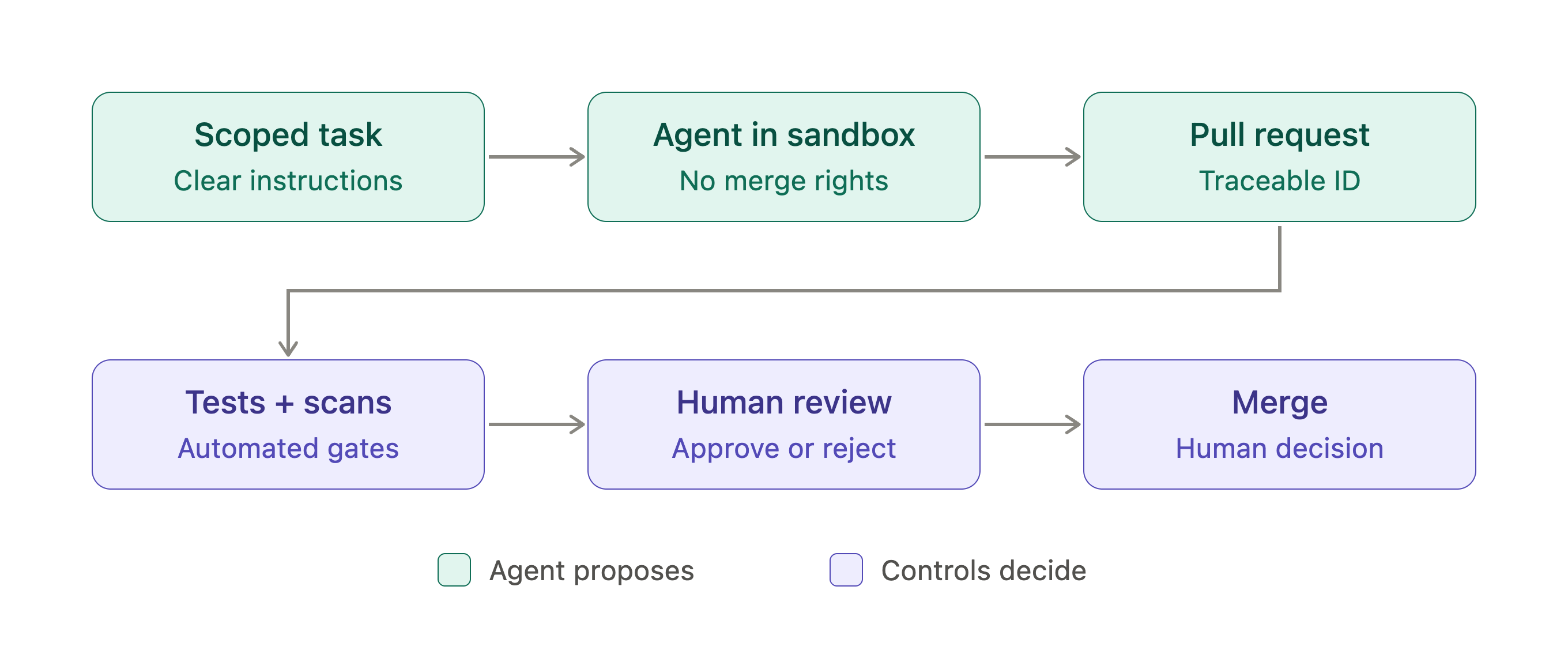
Agents need boundaries by design. In my own setup, I use a cloud coding agent as a tightly scoped connector: it gets predefined instructions, does one job (fetching email and calendar data), and writes its output to a known location with a traceable ID. It doesn’t get open-ended access. That pattern of narrow scope, defined outputs, and traceability is exactly what enterprises need for delegated agents, and it’s why the system-of-record layer insists that agents open pull requests but never merge them.
Tool choice is the least durable decision. Even in a home lab, I’ve swapped models and tools more times than I can count. What survived every change was the structure: where knowledge lives, how agents are instructed, how outputs are checked. Multiply that by an enterprise, and the case for architecture over tools makes itself.
I’ve been codifying these lessons into a framework I call the MenonLabs Agentic Engineering Framework. What follows is the enterprise architecture at its core.
The seven layers
Here’s the model I use. It comes from what I’ve seen across decades of ERP implementations, program management, and IT delivery: the organizations that absorb new technology well are the ones that define the structure first and fill in the tools second. It’s deliberately vendor-neutral.
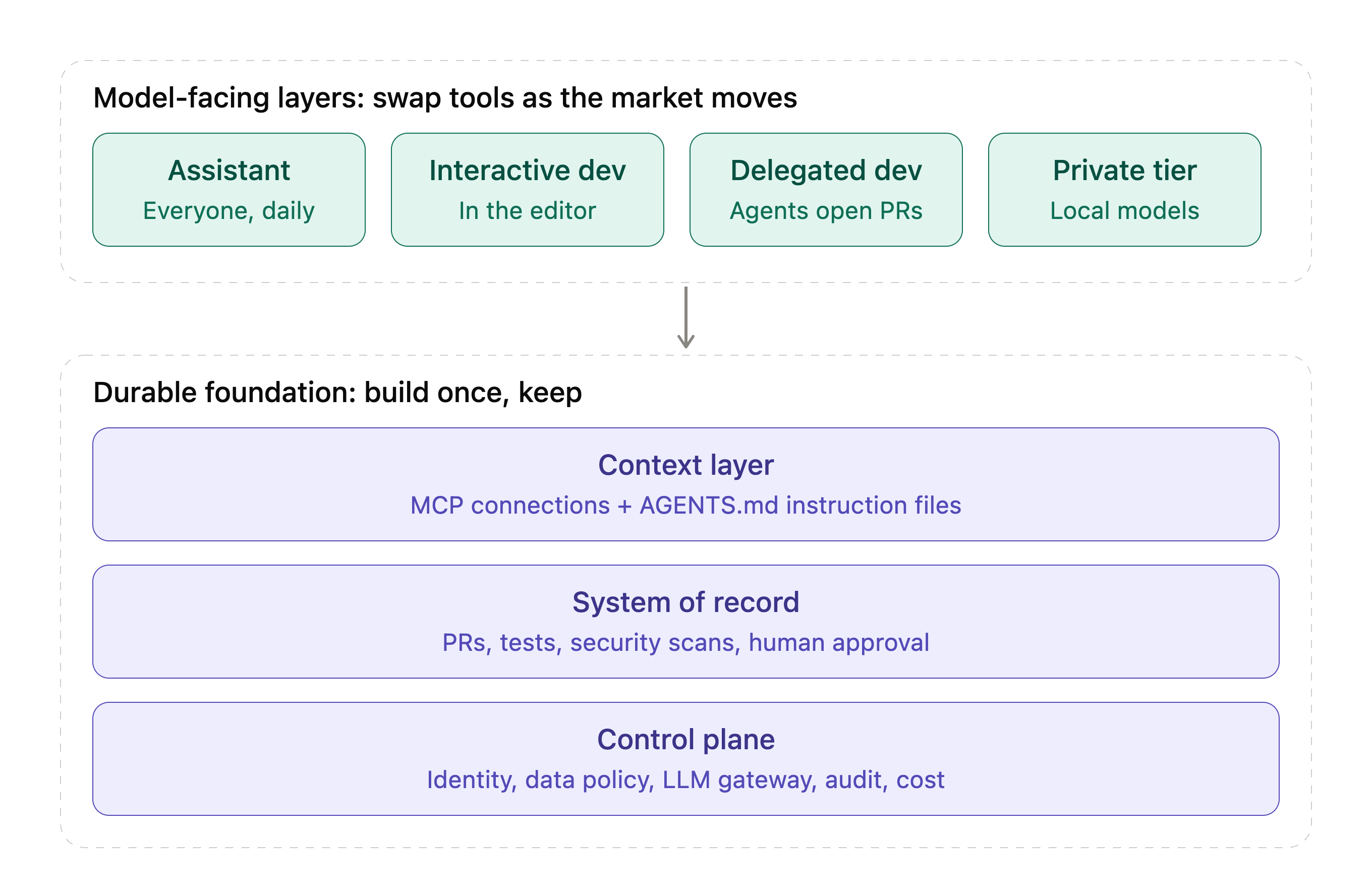
1. The everyday assistant. This is the general-purpose AI that everyone in the company uses for drafting, analysis, research, summarizing, and thinking out loud. It’s the broadest-reach layer and usually the first one you license. The job here is enterprise terms (no training on your data, controlled retention), single sign-on, and a small number of approved connectors to your document stores.
2. Interactive development. This is AI inside the developer’s editor, working alongside them in real time on completions, multi-file edits, and explanations. The key design decision is not which tool, but how many. My recommendation: one primary AI editor per developer, with a clear default and an opt-in path for power users. Paying for two overlapping coding assistants per person is the fastest way to waste budget.
3. Delegated development. This is the layer most organizations haven’t thought about yet, and it’s where the biggest shift is happening. You hand an agent a well-defined task (write tests for this module, upgrade this dependency, document this service) and it works in a sandbox and returns a pull request. The developer’s role moves from writing every line to specifying and reviewing. Start this layer on bounded, low-risk work, and never give agents the ability to merge.
4. The private tier. Some data can’t leave your environment: regulated data, customer PII, sensitive IP. This layer runs open-weight models on developer laptops or on a shared server inside your network. Be realistic about it. Local models are good for restricted-data work, embeddings, redaction, and offline use. They are not yet a replacement for frontier models on complex agentic tasks, and hardware alone won’t justify the investment. Treat this as your data-sovereignty tier, not a cost-cutting strategy. I learned this in my own lab. The local models I run handle private, everyday work well, but I still reach for frontier models when the task is hard.
5. The context layer. AI is only as useful as what it knows about your environment. This layer connects your tools to your systems: ticketing, wikis, API catalogs, database schemas, ERP metadata. Two practices matter here. First, adopt open standards like the Model Context Protocol (MCP) so every tool can reach the same context the same way, instead of wiring each one separately. Second, put a plain-text instruction file (such as AGENTS.md) in every code repository, describing how to build, test, and work in that codebase. Most major coding tools now read it, which means your investment in context survives any vendor switch.
6. The system of record. Every piece of AI-generated code should land in the same place and go through the same checks as human code: a pull request, automated tests, security scanning, and human approval. For most of us, that’s our source control platform. This is the most important layer for governance, because it’s tool-agnostic by design. It doesn’t matter which assistant wrote the change. What matters is that it was reviewed, tested, and traceable.
7. The control plane. This layer sits underneath everything: identity and provisioning, device management, a data classification policy, an LLM gateway for API access, audit logging, and cost tracking. It’s the least exciting layer and the one that determines whether you can scale safely.
Tool options by layer
I promised this wouldn’t be a tool article, but a reference helps. Every layer has credible options across the major ecosystems:
Everyday assistant: ChatGPT Enterprise, Claude for Enterprise, Gemini for Workspace, Microsoft 365 Copilot
Interactive development: GitHub Copilot in VS Code, Cursor, Windsurf, JetBrains AI, Gemini Code Assist
Delegated development: OpenAI Codex, Claude Code, GitHub Copilot coding agent, Google Jules
Private tier: Ollama or LM Studio on laptops; vLLM on a shared server; open models from the Qwen, Llama, Gemma, Mistral, and gpt-oss families
Context layer: MCP servers for your systems and
AGENTS.mdin each repoSystem of record: GitHub, GitLab, Azure DevOps, Bitbucket
Control plane: Your existing IdP and MDM; LLM gateways such as LiteLLM, Portkey, or a cloud provider's equivalent
Notice that the layers with the longest shelf life (context, system of record, control plane) are the ones built on open standards and platforms you likely already own. The layers with the shortest shelf life are the model-facing ones. Invest your effort accordingly.
The one policy that unlocks adoption
If you do only one thing this quarter, publish a one-page data classification policy that maps data types to tools. For example:
Public and internal data can be used with any approved tool.
Confidential data (source code, designs, customer-adjacent information) stays in enterprise tenants with verified no-training and retention terms.
Restricted data (regulated, PII, M&A) stays on the private tier only.
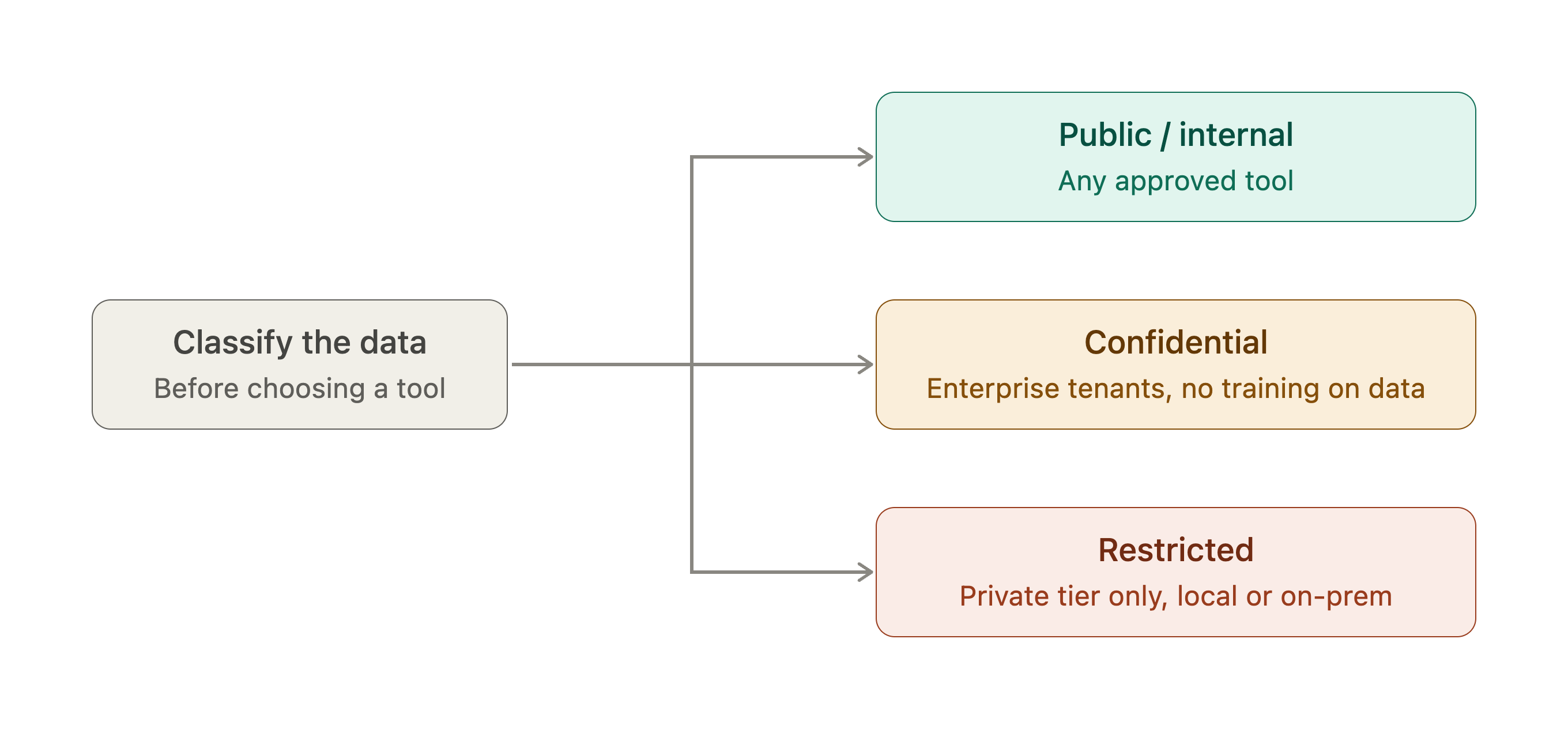
This single table resolves most “am I allowed to use this?” questions. In my experience, ambiguity is the biggest adoption killer. People who aren’t sure they’re allowed will simply not use the tools, and the ones who use them anyway will do it in ways you can’t see.
How to get your team there
The architecture is the easy part. Getting a team from occasional experimentation to daily use takes a deliberate plan. Here’s the sequence I recommend.
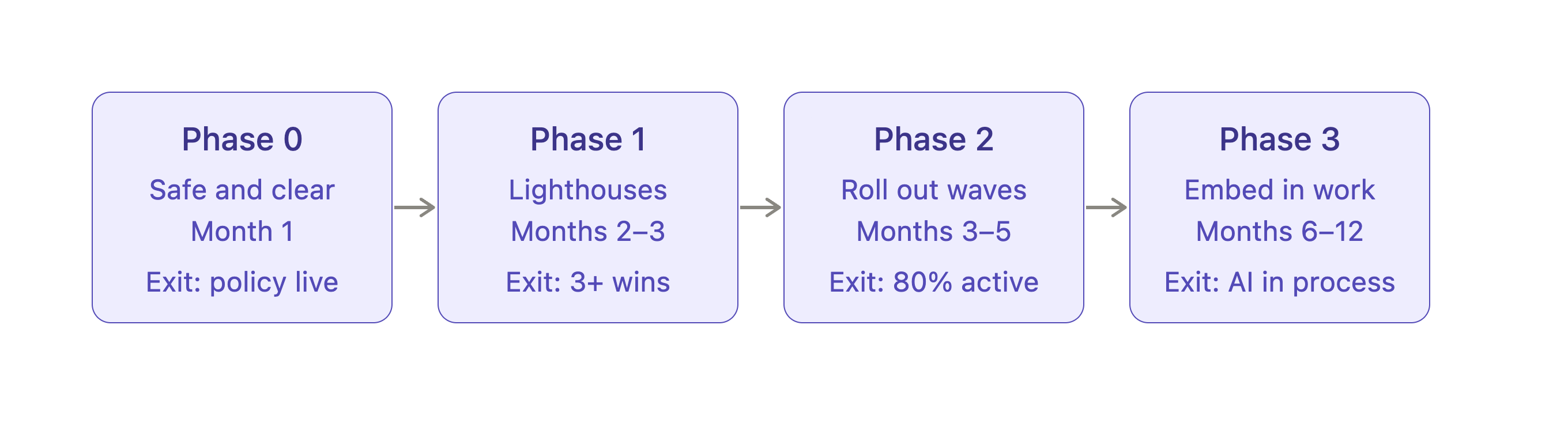
Phase 0: Make it safe and clear (first month). Stand up the control plane: single sign-on on every tool, the data policy, device management, and branch protections plus security scanning on your repositories. Name an executive sponsor and a small group of champions. Choose respected practitioners, not just the enthusiasts. Then have leadership say out loud why you’re doing this. Address the job question directly. If you’re silent on it, people fill the silence with their own fears, and that shows up as quiet resistance.
Phase 1: Prove it with lighthouse projects (months 2–3). Champions go deep on two or three real use cases with clear value and low risk: writing tests for legacy code, documenting undocumented modules, running a framework upgrade, analyzing a messy interface spec. Measure before and after. You need your own numbers, not vendor claims. Champions also write the instruction files for their teams’ key repositories, which is what makes AI output match your standards instead of generic code.
Phase 2: Roll out in waves (months 3–5). One or two teams at a time, each led by its champion. Train by role rather than generically. Developers need different skills (writing good task specs, reviewing AI-generated code) than business analysts (requirements, test scenarios, documentation) or managers (reading adoption data and modeling usage themselves). The most effective format I know is a weekly 30-minute “show your workflow” session where practitioners share their actual screens. Peer demos convert skeptics far better than formal training.
Phase 3: Embed it in how you work (months 6–12). AI stops being optional and becomes part of the process. Delegated agents own the test and tech-debt backlogs. Every pull request gets an AI first-pass review. Story templates include an agent-ready specification. And a small enablement team, drawn from your champions, owns the tooling, patterns, and metrics as a product.
What to measure (and what not to)
Skip lines of code and suggestion acceptance rates. They’re easy to count and tell you very little. Instead, track:
Adoption: weekly active users by tool and team.
Flow: pull request cycle time and lead time for changes.
Quality: change failure rate and defect escapes, especially on AI-authored changes.
Cost: spend per active user.
Sentiment: whether your people actually find it useful.
If cycle time drops and quality holds, you’re winning. If usage is high but quality slips, your review process is the bottleneck, and that’s the next thing to fix.
Four things I’d tell a peer over coffee
First, build something yourself. My most valuable AI education didn’t come from vendor briefings. It came from building things in my own lab, and I’d encourage every IT leader to do the same, even on a small scale.
Second, protect learning time. Asking people to adopt new ways of working on top of a full delivery load is the most common reason these programs stall. Ten percent of their time for the first 90 days is a small price.
Third, lead visibly. If managers still write status reports by hand, the team hears that AI is optional, whatever the strategy deck says.
Fourth, set honest expectations. AI is excellent at tests, boilerplate, documentation, and upgrades. It’s weaker on complex business logic and on the customizations that make your systems yours. Say that up front, start where it shines, and you avoid the “I tried it and it was wrong” dismissal that can set a team back months.
The bottom line
The companies that get real leverage from AI won’t be the ones that picked the best model in 2026. They’ll be the ones that built the structure to absorb whatever comes next: clear rules on data, a single place where all AI work lands and gets checked, shared context that any tool can use, and a team that knows how to work this way. Tools will change. That foundation won’t.
I’d love to hear how others are approaching this. What’s working in your organization, and where are you stuck?
Strong framework overall, Balu -- especially the emphasis on identity, data classification, auditability, controlled agent boundaries, and keeping AI-generated changes behind existing security gates.
My main concern is the “restricted data stays on the private tier” model: data sensitivity alone shouldn’t determine trust; authorization, DLP, secrets management, model/agent isolation, and egress controls still need to follow the workload.
Supportive of the architecture-first direction; I’d just make security a cross-cutting property of all seven layers rather than primarily something represented by the control plane (i.e. The central security and governance layer underneath all AI usage). -- (UK)
NIST's Measure playbook calls for audit logs and human-override metrics. A useful test of your vendor-neutral layers: rerun one bounded workflow on a second model, then compare defects, review edits and cost.